General mapping information
Useful general information for mapping - generic dimensions, limits, warnings etc.
On this page
This page contains general information, limits and sizes that are useful to know when mapping for ETJump. All
measurements assume pmove_fixed 1 and com_maxfps 125 unless stated otherwise.
Player sizes
Values are rounded to integers to match grid in Radiant. Actual values for clearances can be lower, as long as they are still bigger than the bbox.
- Player model size (bbox) - 36x36x72 (XYZ)
- This is the size of
info_player_deathmatchentity.
- This is the size of
- Minimum horizontal clearance - 37 units
- Minimum vertical clearance
- Standing - 73 units
- Crouching - 49 units
- Proning - 41 units
- Jumping - 121 units
Movement
Speed
Ground
| Style | Max speed (units/s) |
|---|---|
| Sprint | 352 |
| Run | 256 |
| Walk | 129 |
| Walk + sprint | 177 |
| Crouch | 80 |
| Prone | 67 |
| Groundstrafe | 452 |
| Wallstrafe | 442 |
Water
If water level is < half of your height (stance dependant), you are still walking normally but your speed is clamped to 267 units/s.
Following values assume axial yaw. Non-axial yaw can provide higher speeds.
- Swimming in water - 160 units/s
- With 35.5 degree pitch, its possible to swim in water at 195 units/s.
- Wallstrafing in water - 174 units/s
- Pitch has no effect when wallstrafing.
- Swimming on water surface - 196 units/s
- Assuming 0 pitch, water bobbing, pitch and yaw affect this. Possible to achieve ~235 units/s.
Stepup
Stepup happens when you are moving against a vertical wall and are within 18 units (vertically) of the top surface. Stepup doesn’t happen if the wall is angled towards you from the bottom, unless the top surface is a seperate brush.
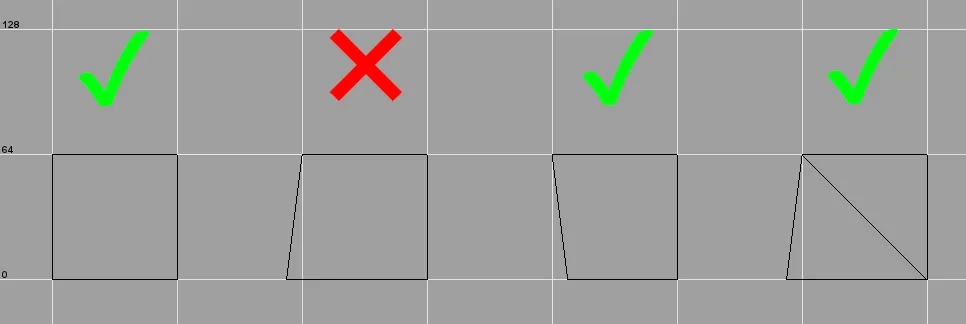 When stepup can happen, jumping
direction from left to right.
Jump height
The following heights are measured online. Offline results may vary.
pmove_fixed 1- 66 units (48 units jump + 18 units stepup)pmove_fixed 0- see table below
| FPS | Height (excl. stepup) | Height (incl. stepup) |
|---|---|---|
| < 125 | 46 | 64 |
| 125/250 | 48 | 66 |
| 333 | 54 | 72 |
| 500 | 37 | 55 |
| 1000 | 35 | 53 |
If the top of the brush you are trying to jump onto is angled, it’s possible to jump onto higher surfaces than these.
The angle of the top matters; maximum values (with pmove_fixed 1 and com_maxfps 125) are 76 units for a standard
jump, and 87 units for a backwards prone jump, when the top is at 45 degree angle.
Jump timing
Note: due topmove_msec 8 , all jump timings have**+/- 8ms** margin of error. The times here represent the elapsed
time between jumping and landing.
- Jump delay - 850ms
- Flat ground jump - 712ms
- 41 unit jump - 848ms
- This is the minimum height difference between gamma pads.
- 64 unit jump - 904ms
Fall damage
Fall damage is calculated from falling speed, not height. These measurements assume flat ground to flat ground with standard gravity.
Falling
| Fall damage | Max height |
|---|---|
| 0 HP | 258 units |
| 10 HP | 320 units |
| 15 HP | 386 units |
| 25 HP | 446 units |
| 50 HP | 513 units |
| Death | >513 units |
Jumping
| Fall damage | Max height |
|---|---|
| 0 HP | 209 units |
| 10 HP | 271 units |
| 15 HP | 337 units |
| 25 HP | 398 units |
| 50 HP | 464 units |
| Death | >464 units |
Note that because ETJump uses adrenaline to give unlimited sprint (if etj_nofatigue is used), all fall damage is
halved & rounded down. When you take fall damage from a fall/jump, the game applies knockback event on you (slick
physics). This lasts for 1000ms for every fall damage event, except for 25hp falls, where it only lasts for
250ms.
Map limits
Compiler limits
These limits are relevant when using the Q3Map2 bundled with NetRadiant-custom. Other Q3Map2 variants might have different limits.
- Maximum amount of surfaces - 131072
- Compiler error - MAX_MAP_DRAW_SURFS (131072) exceeded
- Any visible surface in the map counts towards this limit.
- Soft limit - may be increased with
-maxmapdrawsurfscompiler switch (common option).
- Maximum size of VIS data - 32MB
- Compiler error - MAX_MAP_VISIBILITY exceeded
- Raw, uncompressed data written during compilation - the game does not care about this limit.
- Common error with massive strafe maps. Q3Map2 creates BSP splits every 1024 units, unless worldspawn key
_blocksizeis adjusted. If you run into this error, start gradually adjusting_blocksizeto a higher value, e.g. 2048 or 4096 (per-axis adjustments are also possible). - Contrary to popular belief, setting
_blocksize 0is NOT recommended to get around this. While it helps with this error, it can severely hurt collision detection performance in your map. Only do this if you know what you’re doing.
- Maximum number of VIS portals - 131072
- Compiler error - MAX_PORTALS
- Reduce the complexity of your map’s VIS - badly created structural/detail brush setup is the most likely cause for this.
Engine/mod limits
- Maximum amount of entites - 1024
- Game crash - G_Spawn: no free entities
- Some of these are reserved for the game.
- The actual limit for map to be playable is 949 , but because the game creates entities on runtime (grenades, bodies, medpacks etc.) you should always leave some headroom.
- Maximum amount of brush entities - 511
- Game crash - MAX_SUBMODELS exceeded
- Brush entities are stuff such as
script_mover,trigger_multipleandfunc_static. - These count towards standard entity limit.
- This used to 255, but was increased to the maximum supported by the engine in ETJump 3.3.2.
- Maximum amount of networked shaders - 240
- Game crash - getShaderIndex: configstring overflow - MAX_SHADER_INDEX reached (240), decrease the number of unique shaders referenced by mapscript and entities
- This includes thing such as remapped shaders, custom shaders for
func_explosiveparticles,func_static_client offShaderetc. - This used to be 32 , but the limit was increased in ETJump 3.4.0
- Maximum amount of misc_gamemodels - 1024
- Game crash - MAX_STATIC_GAMEMODELS(1024) hit
- This assumes static misc_gamemodels (no targetname, scriptname or spawnflags set).
- Non-static misc_gamemodels count towards standard entity limit.
- Maximum amount of sounds - 255
- Game crash - G_FindConfigstringIndex: overflow
- This is the amount of unique sounds referenced by the map.
- Maximum number of coronas - 1024
- Game crash - SP_Corona: MAX_STATIC_CORONAS (1024) exceeded
- This assumes static coronas (no targetname, scriptname or spawnflags set).
- Non-static coronas count towards standard entity limit.
- Renderer can only render up to 32 coronas simultaneously.
- Maximum number of dlights - 15/1024
- Game crash - G_FindConfigstringIndex: overflow or SP_dlight: MAX_STATIC_DLIGHTS (1024) exceeded
- 15 is the limit for networked dlights, 1024 for static dlights (no targetname, scriptname or spawnflags set).
- Networked dlights count towards standard entity limit.
- Renderer can only render up to 32 dlights simultaneously.
- Maximum vertices on model - 1024
- Game crash - R_LoadMD3/C: <modelname> has more than 1024 verts on a surface (<number of verts>)
- Applies to mdc/md3 models spawned at runtime (misc_gamemodel, model2 key etc).
Common errors and warnings
- *** Leaked ***
- Your map has a hole into void. If it looks like the red line indicating the leak spot goes straight through a
structural brush, make sure the shader on the brush doesn’t have
surfaceparm trans.
- Your map has a hole into void. If it looks like the red line indicating the leak spot goes straight through a
structural brush, make sure the shader on the brush doesn’t have
- Entity N, Brush N: duplicate plane
- Happens when two faces are combined into one by edge or vertex editing. Use brush cleanup to fix.
- Entity N, Brush N: degenerate plane
- Happens sometimes when 2 vertices of same face are very close to each other (under 1 unit) due to usage of clipper. Use brush cleanup to fix; often deletes the brush and you have to recreate it.
- BaseWindingForPlaneAccu: no dominant axis found because normal is too short
- Related to degenerate plane error. Use brush cleanup to fix.
- Entity N, Brush N: degenerate patch
- This can often happen when capping patches. This always happens when you try to cap a cone; Radiant creates a 0x0 cap at the sharp end of the cone, which is a degenerate patch. Delete the patch by selecting it via the error window or by going to Misc -> Find brush… and entering the correct entity/brush number.
- Backwards tree volume
- All brushes in your map are detail brushes.
- SV_SetBrushModel: NULL
- Most likely cause for this is an improper usage of a special shader in an entity. For example, using an
originshader fortrigger_multipleentity causes this error. Another cause is corrupted brushwork in a brush entity, which can be fixed with brush cleanup.
- Most likely cause for this is an improper usage of a special shader in an entity. For example, using an
Common shaders
This list contains common shaders that are useful for ETJump mapping. This is not a comprenesive list; it only includes stuff thats relevant and actually works. Clip shaders for example have variations with different surface sounds, but they are self-explanatory and are not listed here.
Stock ET


Blocks VIS by culling everything behind it. Must be placed inside door entities to work. Use in conjunction with
skip.

Solid, invisible surface. Generally any surface not visible to player should be caulk.

Invisible surface that blocks player movement but lets everything else through. Used for smoothing out movement and to block non-playable areas.

Invisible surface that blocks players, projectiles and entities, but lets bullets through.

Invisible surface that blocks everything.

Solid surface that disables fall damage. Functionality can be reversed with a nofalldamage worldspawn key.

Structural surface that creates a portal to force a split in PVS. Use in conjunction with skip.

Structural surface that doesn’t create a split in PVS. When placing hint brushes, use this on every surface where
you don’t want a portal to be created.
Same as skip, but filters with hint in Radiant.

Surface that players can grab onto and climb. Note that ladders don’t work if vertical angle is under 45 degrees.

Defines the area included in lightgrid calculation. Lightgrid has a block limit; this can be used to exclude unnecessary areas from it and shrink each block.

Invisible, nonsolid surface. Explicitly marked as a detail brush.

Same as nodraw, but doesn’t explicitly make the brush detail.

Applies water properties to a brush. Use on non-visible faces of water brushes.

Entities inside this brush disappear when they touch the ground.

Used to define origin point for various brush entities. The center of the brush will become the origin of the entity.

Solid, slippery surface.

Used for trigger entities.
ETJump
If you don’t see these shaders in Radiant, make sure you have the latest ETJump mapping assets, available
here. nodelay, noprone, nosave, nonoclip, overbounce and portalsurface
shader functionality can be altered with worldspawn keys.

Players landing on this surface are not affected by jump delay.

Players cannot prone inside this brush.

Same as nodrawwater, except has slightly lower acceleration scale (0.3 vs 0.5). This is technically a stock shader,
but it’s not shipped with Radiant.

Players cannot use noclip inside this brush.

Players cannot save inside this brush.

Players cannot OB on this surface.

Players cannot shoot portals on this surface.

Players cannot shoot portals through this surface. Note: requires custinfoparms.txt to be used while compiling to function.

Surface that both disables fall damage and is slippery.
Tutorial by Aciz